Cloud-managed access
Administer supported doors and access permissions from a central management interface, subject to connectivity and deployment design.

Bring apartment access, visitor entry and property workflows together with Luchismart’s cloud-based access control ecosystem. Give residents a smoother arrival experience while helping property teams manage permissions and activity with greater visibility.
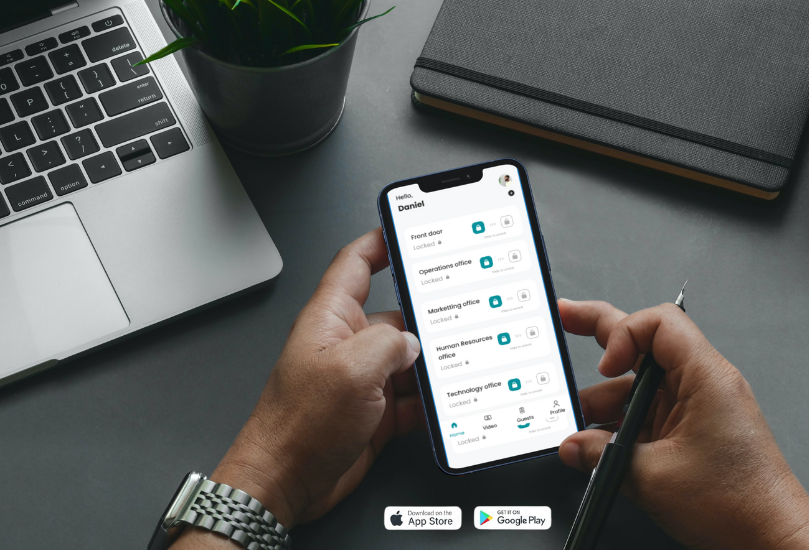
Illustrative interface; available functions depend on your selected hardware, software and configuration.

Apartment buildings and multi-family communities need a balance of convenience, accountability and reliable administration. Luchismart helps centralise access permissions and entry activity so authorised residents, staff and visitors can use the appropriate access methods.
Configure the solution around your building layout, entry points, resident needs and property management processes.
Administer supported doors and access permissions from a central management interface, subject to connectivity and deployment design.
Support convenient mobile access for authorised users through compatible Luchismart services, including the Luchismart GO App where supported.
Set up temporary visitor credentials using the methods available in your installation, with access events recorded where supported.
Review supported entry records to understand access activity and help property teams follow established procedures.
Explore integration between compatible video systems and access control for visual verification and more informed responses.
Where Prop+ is deployed, connect access operations with tenant records, service requests and other property management workflows.
Plan access groups and schedules for different entrances, floors, shared facilities and staff roles according to site requirements.
Explore Prop+ utility and tenant-service capabilities where the relevant modules and integrations are enabled for the property.
Work with the Luchismart team to plan compatible hardware, installation, configuration, onboarding and ongoing support.
A clear deployment process helps align hardware, user permissions and building procedures before go-live.
Map entrances, doors, shared spaces, user groups and the access methods needed at each location.
Install compatible devices and configure access levels, schedules and administrative roles.
Register authorised residents and staff, explain the supported mobile experience and establish visitor procedures.
Review access activity, update permissions when circumstances change and refine workflows as the property evolves.
Combine compatible access hardware and software according to the site survey, security objectives and operational requirements.
Common questions from apartment owners, developers, estate managers and facility teams.
Luchismart supports controlled access with mobile credentials, visitor permissions, activity logs and remote administration, helping authorised residents, staff and visitors enter the appropriate areas.
Luchismart access tools and, where deployed, Prop+ can help managers oversee access and property workflows across supported locations from a central dashboard.
Depending on the installed configuration, residents or managers can issue temporary digital visitor credentials, such as mobile or QR-based passes, and review access events.
Offline access behaviour depends on the selected hardware and deployment configuration. Discuss your site requirements with Luchismart before deployment so the system can be specified appropriately.
The Luchismart GO App is part of the mobile experience for supported Luchismart services. Available functions depend on the products and permissions configured for each property.
Integration depends on the systems, APIs, hardware and project requirements. Share your current property management, CCTV and access setup with the Luchismart team for a compatibility review.
Tell us about your building, entrances, resident capacity and management requirements. We’ll help you identify a suitable Luchismart configuration.