
TCP/IP Connectivity
Designed for network-connected access control deployments. Confirm network and topology requirements for your site.

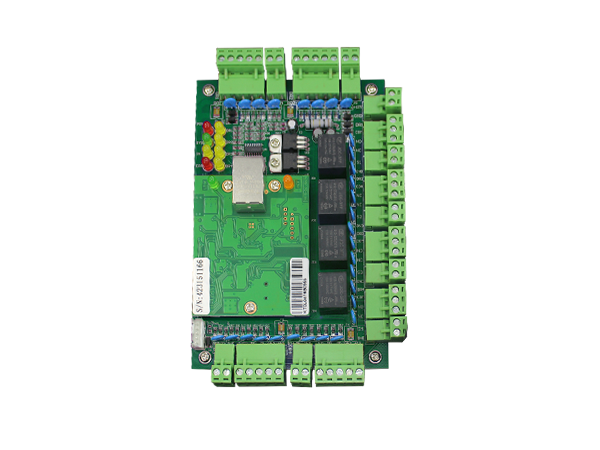
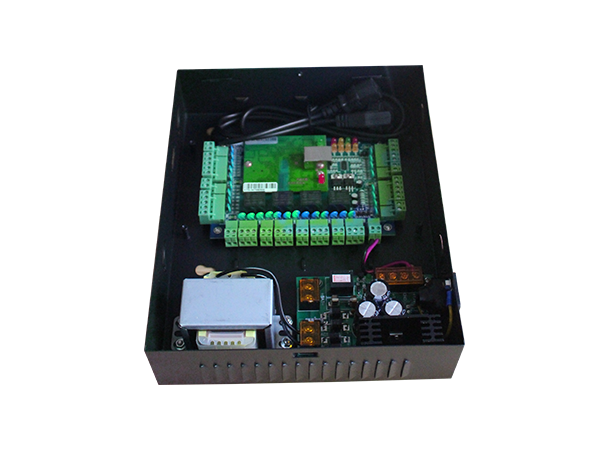
The control layer behind a connected access control system. The Luchismart TCP/IP Access Controller Panel is designed to coordinate supported door access hardware and work with Luchismart Access Software for centralized administration of access permissions and activity.
For offices, commercial buildings, residential properties and other managed facilities, it can form part of a wider access and attendance solution—with mobile workflows available through the Luchismart GO App where supported by the selected configuration.
The controller is part of a complete access control deployment. Pair compatible hardware with the appropriate software, credentials and installation design to support your facility's entry-management requirements.
An access controller is typically planned alongside compatible readers, door hardware, power equipment, network connectivity and management software. During project scoping, confirm door count, entry types, credential methods, reporting requirements, backup power and any third-party integrations. Exact compatibility depends on the hardware model and deployment design.
Explore capabilities that can be part of a Luchismart deployment. Features depend on compatible devices, software configuration and installation scope.
Designed for network-connected access control deployments. Confirm network and topology requirements for your site.
Work with Luchismart Access Software for supported centralized access administration and activity review.
RFID, biometric, PIN or mobile credentials depend on compatible readers and system configuration.
Review supported access activity and event records through the management platform.
Use the Luchismart GO App for applicable mobile access and user workflows when enabled.
Build a wider entry experience with compatible intercom or video products where required.
Support attendance-related workflows through compatible devices and configured software.
Assess API or third-party integrations against documented interfaces and deployment requirements.
The controller is one part of the access ecosystem. Luchismart Access Software provides the management experience for supported users, permissions, schedules and activity records.
Before selecting a controller, consider the number of controlled doors, entry and exit hardware, reader technologies, network conditions, power backup, installation environment and software requirements.
Ask Luchismart to confirm model specifications and compatibility before purchase.
A structured planning process helps align access hardware, software and operational requirements.
Map doors and entry points, identify users and credential preferences, and review network and power conditions.
Install compatible controller and door hardware, connect the system as designed, and configure permissions in the supported platform.
Train administrators, validate access workflows and use available reports and mobile features to manage daily operations.
Subject to system design and compatible hardware, access controllers can form part of access management deployments across different facility types.
Plan access management for buildings and managed residential facilities.
Real estate solutionsMatch controller and reader selection to the facility's access policies.
Browse hardwareAnswers to common questions about choosing and deploying an access controller.
The Luchismart Control Panel is an access-control hardware component designed to coordinate compatible access devices. With the appropriate configuration, it works alongside Luchismart Access Software for supported administration and activity workflows.
The product is presented as a TCP/IP access controller. Confirm the exact model, network requirements and available connectivity options with Luchismart before ordering.
RFID cards, biometrics, PINs and mobile access depend on the compatible readers, locks and software configuration selected for the installation.
Remote management depends on the controller installation, connectivity and supported Luchismart Access Software configuration. Confirm required functions and connectivity conditions during project planning.
The Luchismart GO App supports applicable mobile workflows in compatible deployments. Available functions depend on system configuration and user permissions.
Attendance workflows may be supported through compatible readers and configured Luchismart software. Confirm required attendance features and reporting before deployment.
Pricing depends on the model, quantity, compatible readers and door hardware, software, installation and integration requirements. Use the quotation tool to request project-specific pricing.
Use the project quote page or contact Luchismart with your door count, site type, credential preferences and integration requirements. Ask for confirmation of model specifications and compatibility before purchasing.
Share your site requirements to scope the access controller, compatible readers, door hardware, software and installation needs for your project.